
🔊 Audio input & when it's not reacting
VJam reacts to "the sound coming in". So getting sound in properly is huge 🎧 Here are the three ways to feed it, plus how to fix "it's not reacting!".
🎚️ Three sources
| Source | How to start | In a word |
|---|---|---|
| 🎤 Mic | Auto on launch (picks up) | VJam's default. Play with room sound 🎤 |
| 🎵 Audio file | Drag & drop, or the [AUDIO] button | Handy for recording, repeatability, and track info 🎼 |
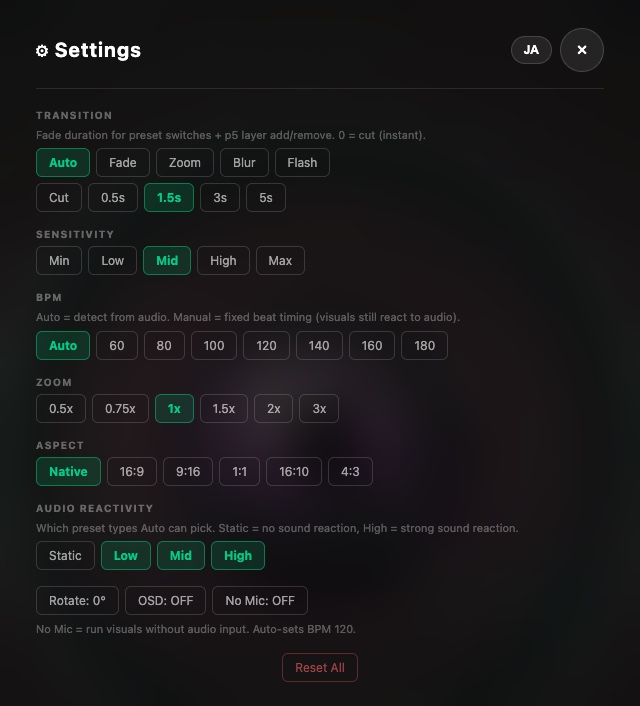
| 🤖 Demo | Settings ⚙ → turn [No Mic] on | Runs on a synthetic beat with no sound. A fallback for silent rooms / checking it works |
The mic is the main input. VJam is built to pick up the sound around your PC/phone and react live — nothing to "insert", it just listens 🎤
Audio files are for specific uses: recording to the same track, showing title/artwork, or reproducing the same reaction reliably — you load them into the screen 🎵
Demo (No Mic) is a fallback mode you won't normally use — only when the mic can't pick anything up, or you want to see the visuals move in a silent room. Turn it on via Settings ⚙ (the ⚙ button at the top of the Cockpit) → [No Mic] 🤖
🎤 Using the mic
- Allow the mic on launch → it picks up room / speaker sound and reacts
- It reacts to more than music: voice, claps, desk taps, and room noise all count 🗣️👏
- The easiest first check is in a quiet place: talk toward the screen. Saying "aaah" or "check" is enough 🎤
- VJam splits incoming sound into values like
bass/mid/treble/beat. What you actually see depends on the selected preset and Mod settings 🎛️ - Built-in mics are fine for playing right away. If the reaction feels weak, try volume, speaker position, and Sensitivity first 👂
- Picking up too much / too little? Adjust Sensitivity in Settings ⚙️ (Min–Max)
🎵 Using an audio file
- How 👉 drag & drop an MP3/WAV onto the screen, or the [AUDIO] button in Cockpit
- Once loaded, it lands paused at 0:00 (it doesn't start blasting). Press [AUDIO] again to play ▶
- The button cycles
off(mic) →paused(loaded, stopped) →playing
- The button cycles
- The title, artist, and album art get read automatically and can show on screen 🎼
- To swap tracks 👉 use the reload glyph (↻)

🥁 BPM: Auto and Manual
In Settings ⚙️, BPM:
- Auto 👉 detects tempo from the sound (can wobble)
- Manual (60–180) 👉 fixes the tempo. Visuals still react to the sound; only the beat timing stays steady 🎯 Handy when you want a tight rhythm
🎛️ Sensitivity and Audio Reactivity
Settings ⚙️ has two controls that sound similar but do different jobs.
| Control | What it changes | When to use it |
|---|---|---|
| Sensitivity | How strongly VJam reads incoming sound | When reactions feel weak or too twitchy. Start here and move Min–Max |
| Audio Reactivity | Which preset types Auto can pick | If Auto keeps choosing quiet visuals, turn off Static. Keep High / Mid on when you want more sound-reactive presets |
Audio Reactivity does not amplify the preset currently on screen. If the current look barely reacts, raise Sensitivity first. If it still does not change much, switch to another preset and compare.
🎚️ Visuals shaking? Try REACT
Loud, fast songs can make the visuals look like they are shaking. When that happens, slide REACT (just above the crossfader in the Cockpit) to the left.
- What it changes 👉 How often the visuals react to sound. Right end 100% = every time, middle 50% = about half as often, left end 0% = no sound reaction
- How it differs from Sensitivity 👉 Lowering Sensitivity weakens the reaction itself. REACT keeps the reaction strength and only reduces how often it happens
- It glows yellow below 100%. Double-click to reset to 100%
- Also works with MilkDrop. When mapping a MIDI knob, look for
REACT
🆘 Fixing "it's not reacting!"
Look it up by symptom 👇
The visuals move, but nothing reacts to the sound
- ✅ Check the mic permission first. VJam actually keeps the visuals moving even without permission — so "moving but not reacting" is a sign the mic isn't coming in
- Click the 🔒 or mic icon in the address bar → allow the mic → reload the page 🔄
- ✅ In a quiet place, talk toward the screen. If "aaah" or "check" makes it react, the mic is working 🎤
- ✅ Is sound actually playing? Your speakers need to be putting out sound (the mic picks that up)
- ✅ If you loaded an audio file, is [AUDIO] set to
playing? (paused= silence)
You denied the mic by mistake
Start with the case that matches what you see 👇
| Current state | What to do |
|---|---|
| You do not want to stop the visuals | Keep going in No Mic mode. VJam can still render visuals without microphone input |
| You want to allow the mic again | Pick your browser in the table below → allow the mic → reload |
| You already allowed it again | In VJam Settings ⚙️, turn [No Mic] OFF to retry microphone input |
| You opened VJam inside LINE / Instagram / X | In-app browsers make permissions hard to find. Reopen https://vjam.art in Safari / Chrome |
| Environment | Where to allow the mic again |
|---|---|
| PC Chrome / Edge | Click the 🔒 / mic icon in the address bar → set Microphone for vjam.art to Allow → reload |
| Android Chrome | Chrome menu → Settings → Site settings → Microphone → unblock vjam.art → reload |
| iPhone / iPad Safari | Open Settings app → Apps → Safari → Microphone and set it back to Allow / Ask. If Safari appears directly in Settings, use Settings app → Safari → Microphone |
| iPhone / iPad Chrome | Open Settings app → Apps → Chrome → Microphone and turn it ON. If Chrome appears directly in Settings, use Settings app → Chrome → Microphone. If the mic icon appears in the address bar, also use it to allow vjam.art |
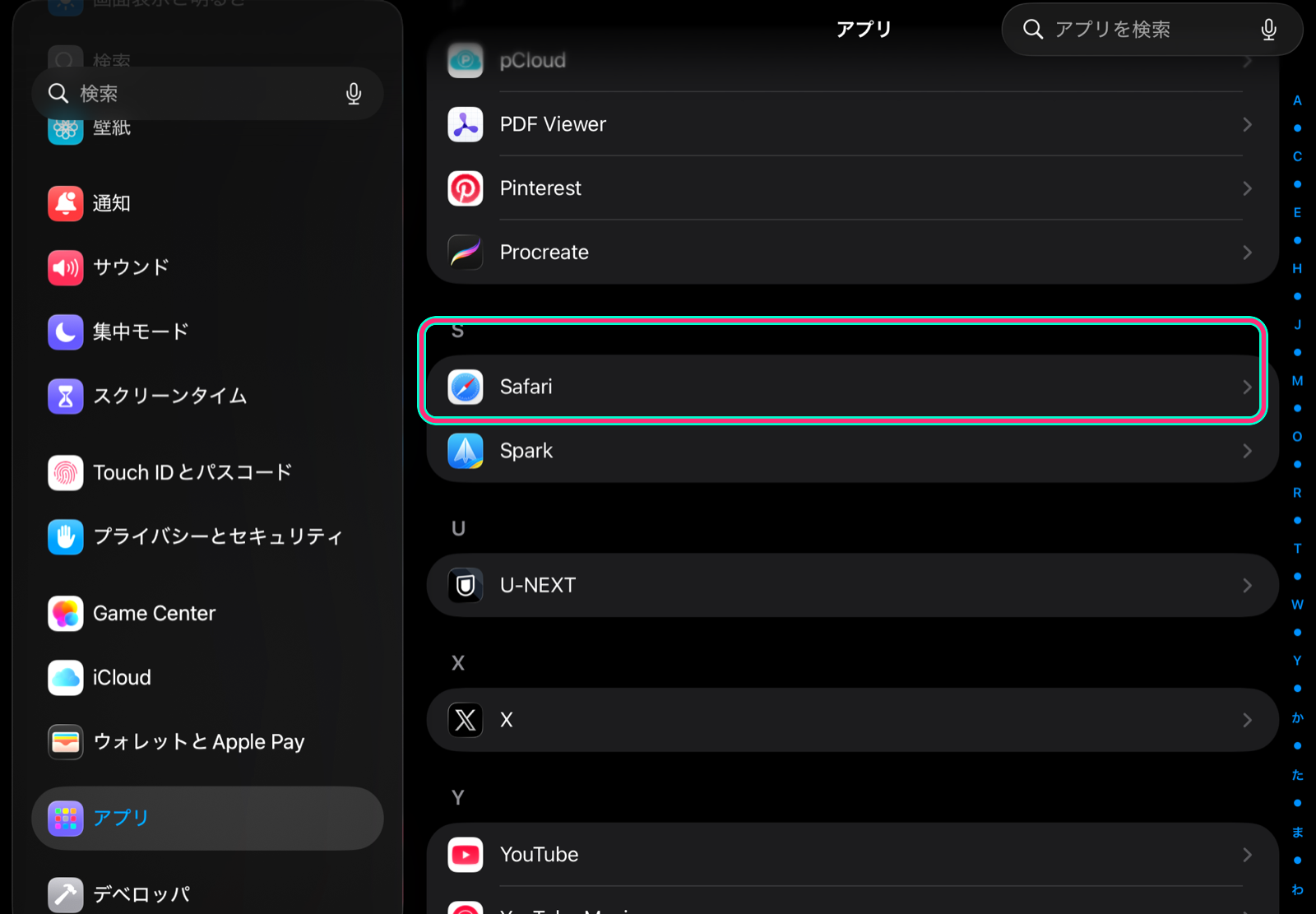
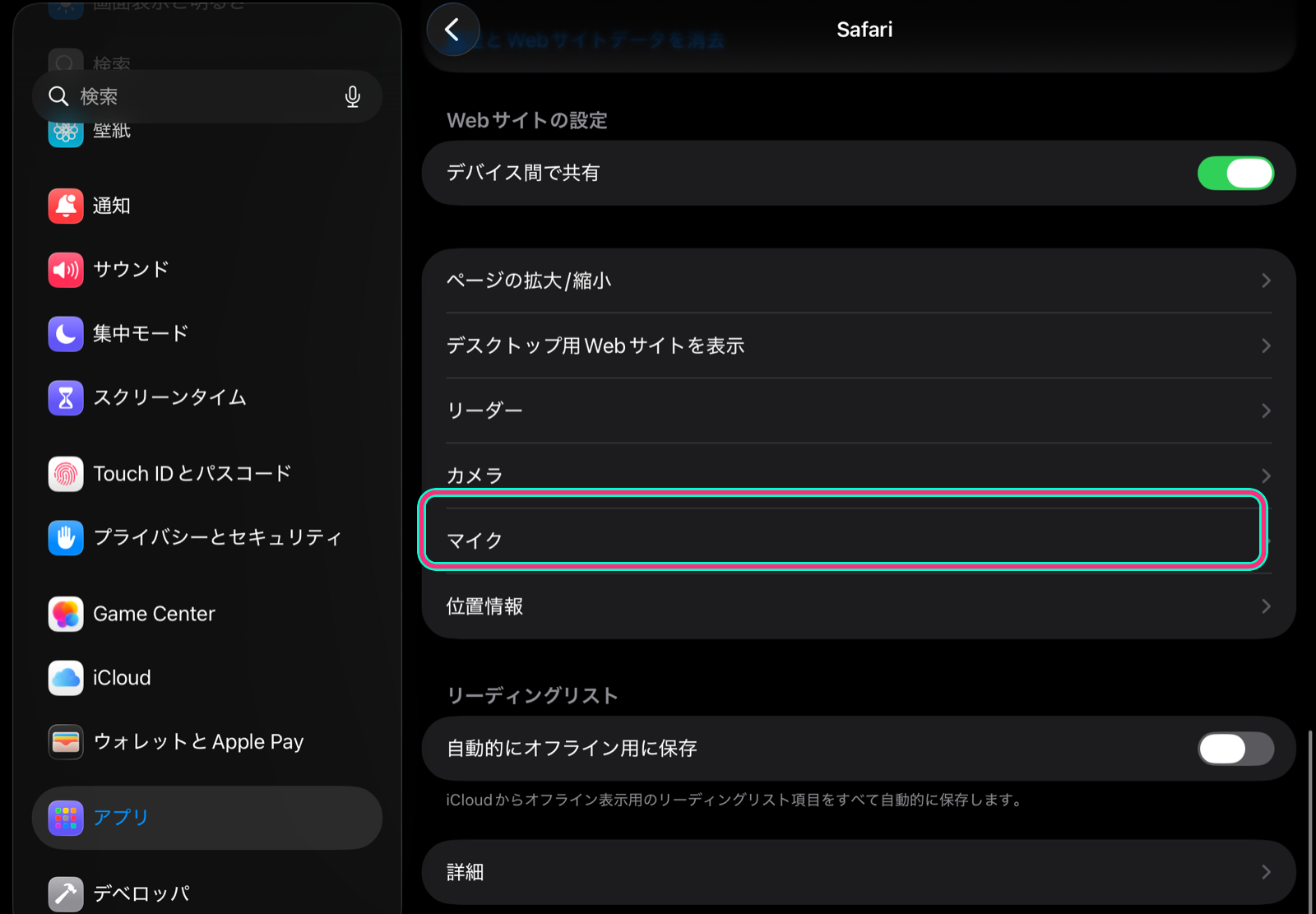
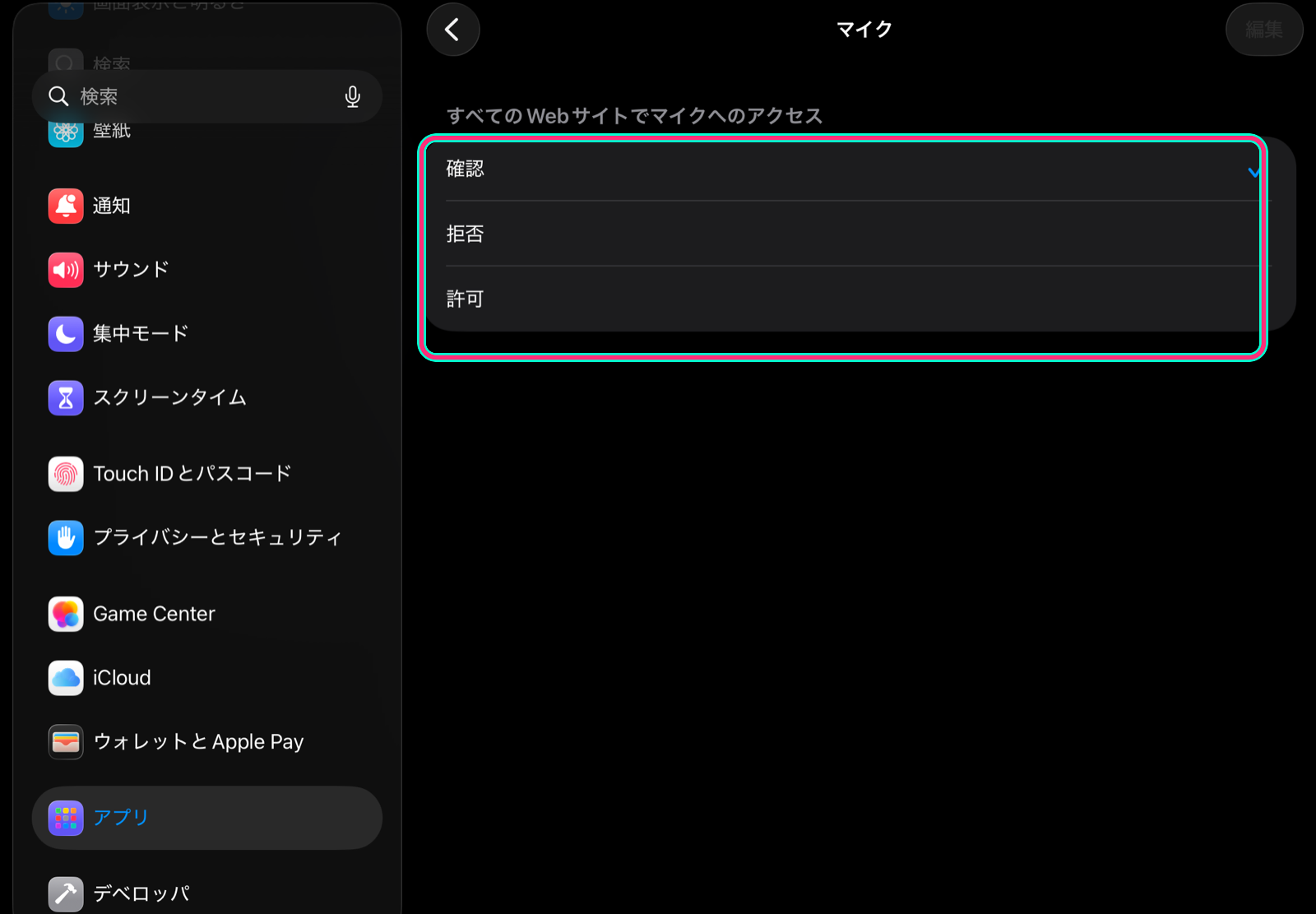
Note: labels and locations can vary slightly by iOS / iPadOS version.
Reactions are sluggish / too twitchy
- 👉 First tweak Sensitivity in Settings ⚙️. This changes how strongly VJam reads the mic / audio file input
- 👉 If Auto keeps choosing visuals that do not react to sound, use Audio Reactivity in Settings ⚙️: turn off Static and keep High / Mid on. This changes Auto's preset choices; it does not amplify the preset currently on screen
No sound coming in on iPhone / Safari
- 👉 iOS is strict about audio. Tap the screen once before starting (autoplay block), and check Safari's microphone permission
- 👉 If the Home Screen version or an in-app browser is unstable, first reopen
https://vjam.artin a normal Safari tab - 👉 Still stuck? PC + Chrome / Edge is the most reliable setup
The recording came out with no audio
- 👉 To record with audio you need audio-file mode. Make sure the recording's audio setting isn't on Silent (more in the 🔴 Recording chapter)
🔗 Related
- Build sound-reactive visuals → 🎨 Presets
- Show title and artwork → 🎵 Track info
- Record with audio → 🔴 Recording
- Send audio into a stream → 📡 Streaming
- Map BPM or controls to hardware → 🎹 MIDI