
🎛️ Controller mapping charts
Popular DJ controllers get a default VJam mapping loaded automatically the moment you plug them in over USB ✨ No need to Learn anything — just start playing (of course you can still remap freely with MIDI Learn).
This page shows, for each supported controller, which knob/pad drives what in VJam — laid out over a real photo. Keep it open as a cheat sheet during a show 🎶
🎮 Gamepads (USB / Bluetooth)
Common game controllers such as Xbox, PlayStation, and Switch Pro controllers can work as a simple remote for existing keyboard shortcuts. This is separate from MIDI Learn, and there is no on-screen setup UI. Plug it in, start VJam, press a button once, and it should begin responding.
How to use
- Connect the gamepad over USB or Bluetooth
- Open VJam
- Start VJam as usual
- Press any gamepad button once
- Play
If nothing responds, open the browser DevTools Console and run vjam.gamepadStatus(). It shows the detected controller name, currently pressed buttons, and the recent input log.
Fixed mapping
The layout follows VJam's existing keyboard shortcuts as closely as possible.
| Gamepad | Keyboard equivalent | VJam action |
|---|---|---|
| D-pad right | ArrowRight | Random MilkDrop |
| D-pad left | ArrowLeft | KILL (quick blackout) |
| D-pad up | ArrowUp | Cycle BLEND |
| D-pad down | ArrowDown | Cycle FILTER |
| Start / Options | Space | Open / close Cockpit |
| A / Cross | A | Turn AUTO on / off |
| B / Circle | Enter | Add one random p5 |
| X / Square | D | Crossfade to the other deck |
| Y / Triangle | F | Fullscreen |
| L2 | R | Start / stop recording |
| R2 | P | Open / close Projector |
| L1 | - | Make Deck A live |
| R1 | - | Make Deck B live |
| Left stick horizontal | - | Move the crossfader left / right |
Good to know
- Gamepads are not MIDI, so they do not appear in MIDI Learn
- There is no UI; the mapping is fixed for now
- Some browsers do not expose the controller until you press a button once
- Button numbering can vary by controller. Use
vjam.gamepadStatus()to inspect what the browser sees
🕹️ 8BitDo Micro (dedicated layout)
The palm-sized 8BitDo Micro gets its own layout the moment you plug it in ✨
Set the switch on the back to D 👉 VJam can't use it in S or K mode. USB and Bluetooth both work with the same layout 📶 (pair it over Bluetooth while in D mode)
| Micro | VJam action |
|---|---|
| D-pad left / right | Move the crossfader (only while held) |
| D-pad up | Cycle BLEND |
| D-pad down | Cycle FILTER |
| A | Add one random p5 |
| B | KILL |
| X | Random MilkDrop |
| Y | Turn AUTO on / off |
| L / R | Previous / next FAV |
| − | Open / close Cockpit |
| + | Save the current screen as a FAV ⭐ |
L2 / R2 are unassigned. The ★ button opens the macOS Games app, so VJam can't use it.
🎚️ Pioneer DDJ-WeGO
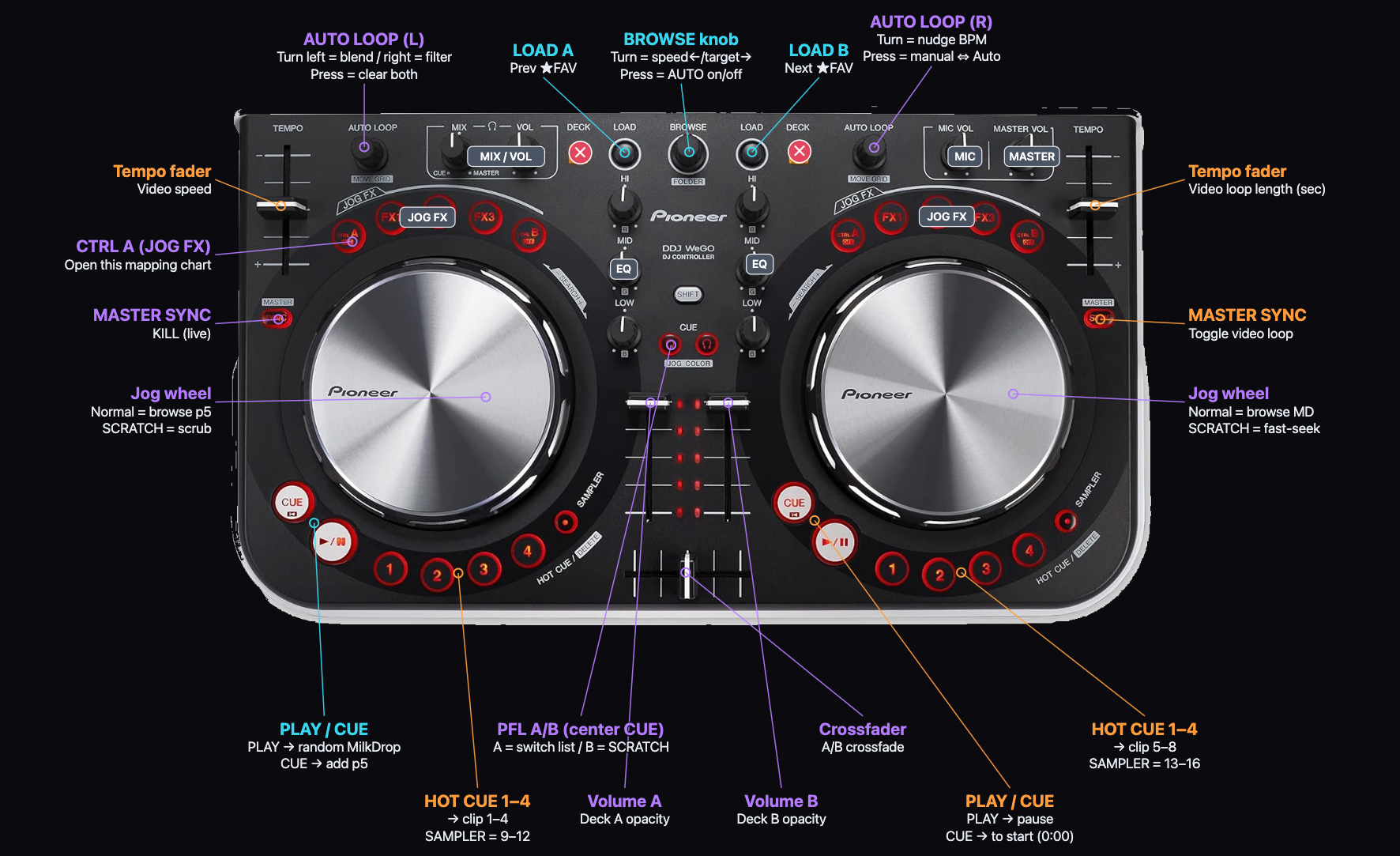
Colors are grouped by when you use them (in the figure) 👇
| Color | Meaning |
|---|---|
| 🔵 Cyan | Preset stuff (MilkDrop / p5) |
| 🟠 Orange | Video / scratch stuff |
| 🟣 Purple | Common (anytime) |
📋 Full control chart (everything)
Your cheat sheet when the figure is too small 👇 tap an action to jump to its full guide 🔗
The rough split: left hand = presets (MilkDrop/p5), right hand = video clips, center = mixer. On the DDJ-WeGO the same knob does different things per side, so below is grouped by control type, with 🅰 left (Deck A) and 🅱 right (Deck B) side by side.
🔁 Left/right paired controls
| Control | 🅰 Left deck (preset side) | 🅱 Right deck (video side) |
|---|---|---|
| 🎚️ Tempo fader | Push up to speed up video playback | Push up to make the video loop longer (sec) |
| 🔄 AUTO LOOP knob | Turn left = blend, right = filter; press = clear both | Turn to nudge the BPM; press = toggle BPM manual ⇔ Auto |
| 🛞 Jog wheel | Normally browse the p5 list; with SCRATCH on, scrub the video | Normally browse the MilkDrop list; with SCRATCH on, fast-seek the video |
| 🎚️ Channel fader | Raise/lower Deck A's opacity | Raise/lower Deck B's opacity |
| ⏏️ LOAD | Recall the previous ★FAV | Recall the next ★FAV |
| ▶️ PLAY | Jump to a random MilkDrop | Pause the video |
| 🎯 CUE | Add a random p5 | Send the video back to 0:00 |
| 🔘 SYNC | Kill the visuals for a beat (live blackout) | Toggle the video loop |
| 🥁 HOT CUE 1–4 | Recall clip 1–4 | Recall clip 5–8 |
| 🔴 SAMPLER 1–4 | Recall clip 9–12 | Recall clip 13–16 |
| 🎛️ JOG FX (CTRL A/B, FX1, FX3) | Unused — map via Learn | Unused — map via Learn |
| 🎚️ EQ (HI / MID / LOW) | Unused — map via Learn | Unused — map via Learn |
🎛️ Center (one each / mixer)
| Control | What it does in VJam |
|---|---|
| 🎛️ BROWSE knob | Turn left = AUTO speed (off→slow→mid→fast), right = AUTO target (both→MD→p5); press = toggle AUTO on/off |
| ↔️ Crossfader | Crossfade (mix) A and B |
| 🎧 PFL A (left center CUE) | Switch which list the jog browses (p5/MD → images/video → FAV/history) |
| 🎧 PFL B (right center CUE) | Toggle SCRATCH mode (on = the jog scrubs the video) |
| 🎚️ MIX / VOL (headphone) | Unused — map via Learn |
| 🎙️ MIC VOL | Unused — map via Learn |
| 🔊 MASTER VOL | Unused — map via Learn |
| 🔼 SHIFT | Modifier key — does nothing on its own (can't map) |
| ⚠️ DECK (C/D) switch | Don't press (it swaps the channel and drops every mapping) |
🧠 Good to know
- ⚠️ Don't press the DECK toggle (the yellow C/D) — it shifts the channel and temporarily drops your mappings
- The "unused" empty buttons are yours to map via MIDI Learn 🎛️
- The jog's behavior changes with PFL B (SCRATCH) — normally it browses, turn it on to scrub the video 🛞
🎚️ Numark DJ2GO2 Touch
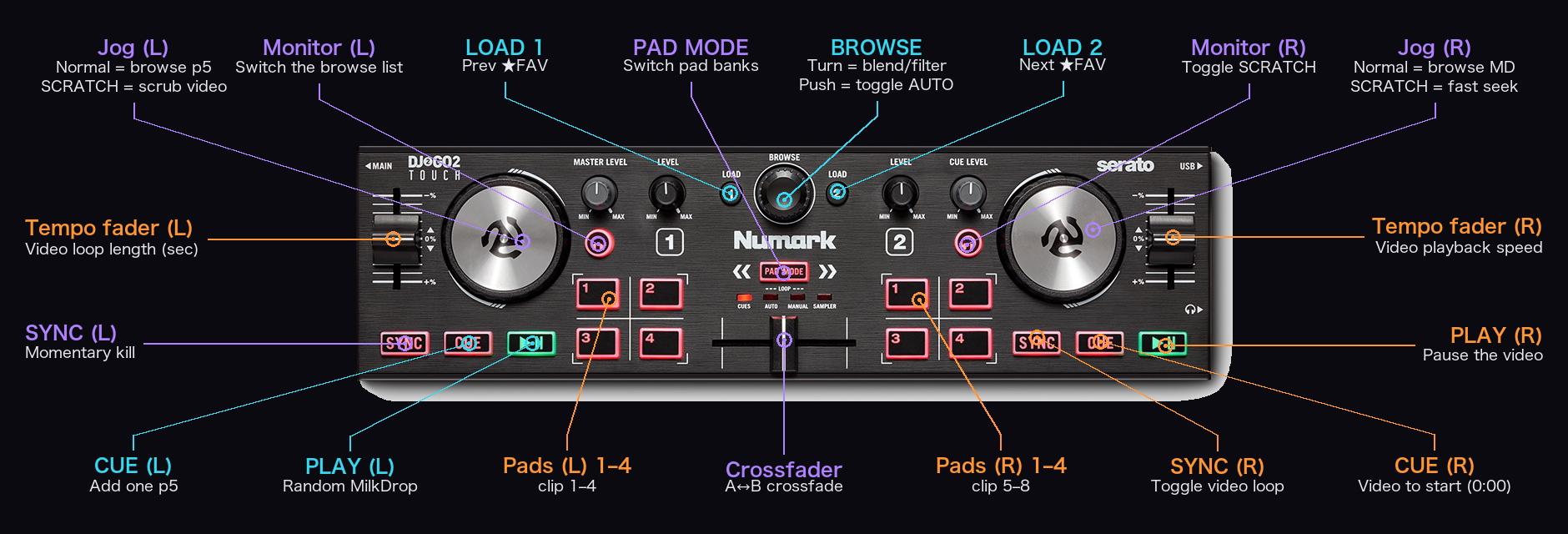
Colors are grouped by when you use them (line color in the figure) 👇
| Color | Meaning |
|---|---|
| 🔵 Cyan | Preset stuff (MilkDrop / p5) |
| 🟠 Orange | Video / scratch stuff |
| 🟣 Purple | Common (anytime) |
A palm-sized, compact unit — same idea as the DDJ-WeGO (left = presets, right = video, center = mixer) with fewer knobs 🎛️ Pull presets randomly with PLAY/CUE, or browse the list with the jog — both work. The touch jogs can scratch the video too.
📋 Full control chart (everything)
Tap an action to jump to its full guide 🔗
🔁 Left/right paired controls
| Control | 🅰 Left deck (preset side) | 🅱 Right deck (video side) |
|---|---|---|
| 🎚️ Tempo fader (vertical) | Push up to make the video loop longer (sec) | Push up to speed up video playback |
| 🛞 Jog (touch) | Normally browse the p5 list; with SCRATCH on, scrub the video | Normally browse the MilkDrop list; with SCRATCH on, fast-seek the video |
| ▶️ PLAY | Jump to a random MilkDrop | Pause the video |
| 🎯 CUE | Add a random p5 | Send the video back to 0:00 |
| 🔘 SYNC | Kill the visuals for a beat (live blackout) | Toggle the video loop |
| 🎧 Monitor button (🎧) | Switch which list the jog browses (p5/MD → images/video → FAV/history) | Toggle SCRATCH mode (on = the jog scrubs) |
| 🎛️ LEVEL / CUE LEVEL knobs | Unused (no volume bus) — map via Learn | Unused — map via Learn |
🎛️ Center (mixer)
| Control | What it does in VJam |
|---|---|
| 🎛️ BROWSE encoder | Turn = switch blend/filter; press = turn AUTO on / off |
| ↔️ Crossfader | Crossfade (mix) A and B |
| ⏏️ LOAD 1 | Recall the previous ★FAV |
| ⏏️ LOAD 2 | Recall the next ★FAV |
| 🎚️ MASTER LEVEL knob | Unused (VJam has no master volume) — map via Learn |
🥁 Pads (PAD MODE cycles 4 banks = 32 clips)
Press ◀ ▶ (PAD MODE) to jump to the next 8 slots. Pads always affect the currently live deck (no A/B split) 👇
| PAD MODE | 🅰 Left pads 1–4 | 🅱 Right pads 1–4 |
|---|---|---|
| CUES | clip 1–4 | clip 5–8 |
| AUTO LOOP | clip 9–12 | clip 13–16 |
| MANUAL LOOP | clip 17–20 | clip 21–24 |
| SAMPLER | clip 25–28 | clip 29–32 |
🧠 Good to know
- Pull presets randomly with PLAY/CUE (PLAY = random MilkDrop / CUE = add one p5), or browse the list with the jog (normal jog: left browses p5 / right browses MilkDrop) 🎛️
- The jog's behavior changes with the right monitor button (SCRATCH) — on = scrub the video, off = browse the list 🛞
- The MASTER / LEVEL / CUE knobs are unused (VJam has no volume bus) → map them freely via MIDI Learn 🎛️
- All 32 pad slots hit the live deck (VJam has no pre-cue output, so there's no left/right split)
🔗 Related
- MIDI connection and Learn → 🎹 MIDI
- Left-side preset controls → 🎨 Presets
- Center fader and decks → 🎱 Deck A/B
- Right-side video / scratch controls → 🎬 Video
- Pre-show connection checks → ✅ Pre-show checklist